Rolltop is a portable computer development
concept for designer, architect and everyone, who would like to have a gadget,
which, from an aesthetic standpoint alone, certainly hits the mark. By virtue
of the OLDE-Display technology and a multitouchscreen the utility of a laptop
computer with its weight of a mini-notebook and screen size of 13 inch easily
transforms into the graphics tablet, which with its 17-inch flat screen can be
also used as a primary monitor due to the support attached to the back of the
screen.
The stylus, power
adapter and USB ports are all on a detachable stand while the other standard
accompaniments such as the mouse, keyboard, webcam and power cable are
integrated beautifully into the Rolltop itself. And the OLED display also means
a much lower power consumption and an "outstanding" battery life.
During CES 2012 Sony Ericsson had a new accessory to show off in the
form of a new Bluetooth watch that can apparently play nicely with most Android smartphones
running Android 2.1 and above and is called the Sony SmartWatch, so one
can assume that Sony has now dropped the Ericsson part of the name.
The device itself is connected to your handset via Bluetooth
and can answer calls, play music, act as a notifier, and allows the
user to check on their social networks such as Twitter and Facebook and
all done by a new app running on your phone and controlling the
SmartWatch.With typical usage the battery life of the Sony
SmartWatch is said to last four days, which seems very reasonable to me,
the device sports a capacitive touch screen that works well although
when asleep you need to tap the side button to wake it up.
Alongside its Sony Xperia Ion and Xperia S Android smartphones, Sony also used CES to launch its new Xperia Watch, the latest attempt at a connected watch.
The Xperia watch features a 1.3 inch OLED 128x128 resolution display and is designed to connect to Sony's Xperia Arc S (the latest Xperia smartphone) via Bluetooth. This allows you to use the watch to answer calls, read texts, control music, interact with certain apps like Facebook and Twitter, and even check weather reports.
Among
the coolest (or most pointless - but aren't many of the coolest things
in life?) is the ability to see the view through your phone's camera on
the watch. The usefulness of this might be debatable but it works pretty
well.
Crucially
the watch actually looks pretty good. It's slim at just 8mm thick, and
is only 36mm square. It also feels well built with a glass screen and
metal chassis and buttons, and a comfortable (if sweat-enhancing)
silicone strap. It also weighs just 15.5g.
It’s still dependent on connection to an Android phone via Bluetooth
for all of its functionality, and that’s where the missing the mark bit
comes in. Unlike the MotoACTV or even the iPod nano, the Xperia
Smartwatch has no memory of its own. It can’t play music by itself, it
simply controls music streamed from your phone. Though it runs some
flavor of Android, it’s little more than a dumb terminal.
The new Mac mini. Now up to 2x faster, it’s mini in size only.
Mac mini is even more of a powerhouse, thanks to new dual-core Intel Core i5 and i7 processors, discrete AMD Radeon HD graphics, and ultrafast Thunderbolt technology. It also comes with OS X Lion, the world’s most advanced desktop operating system. And Mac mini with Lion Server now features a quad-core Intel Core i7 processor for incredible performance. But it’s as easy as ever to set up and run.
When the Mac mini first arrived on the scene, it was in many ways a tool for Apple to attract Windows users and get them to switch to Apple. Since then, it's still been an occasional switcher tool but is now increasingly used for home theaters and servers. With a Core i5 and even optional dedicated graphics in the 2011, the tiny computer is poised to grow even larger. But will the lack of an optical drive set it back? Read our 2011 Mac mini review to find out.
Since then, it has still played that role, and continues to be sold without peripherals. It has also evolved into what many consider to be the ideal home theater PC. The latest iteration of the Mac mini has now arrived, and not without controversy. It takes a huge leap forward in speed with Intel’s second-generation Core-series processors. The 2.5GHz Core i5 Mac mini we've reviewed also sports a first fordiscrete graphics chip that opens the door to gaming for the first time. But without an optical drive, it's a major gamble on the future of software and that price trumps a DVD drive.
Design and expansion
The Mac mini itself is classic Apple. It revolves around a minimalist, industrial design with a now seamless unibody enclosure borrowed from the previously server-only edition; it's one of the few small form factor computers that looks attractive, not just functional. Underneath the device is a circular cover that is designed to be twisted off to allow you to upgrade the RAM yourself. While we'd like to have the option to more readily replace the hard drive, having quick access to the memory is still appreciated. More adventurous owners can upgrade the drives if they like, although there's a good chance you'll void your warranty in the process as you empty a large part of the case.
On the back, the user is greeted by the same array of ports as on the 2010 model, with one major excpetion. There are four USB 2.0 ports -- USB 3.0 sadly remains missing -- as well as a FireWire 800 port, an SDXC card slot, audio out and line in jacks, and an HDMI port. In place of the pure Mini DisplayPort, however, is the Apple- and Intel-developed Thunderbolt port. While there's not as much expansion as on a tower PC, it's surprisingly good at accommodating most home users and even pros. Who'd have thought just a year ago that a Mac mini could handle an external, multi-disk array of solid-state drives as well as if it were inside the computer?
Performance: objective and subjective testsThe 2.5GHz Mac mini is well equipped to be a solid everyday computer, at least on paper. Apple claims that the 2.5GHz model outperforms the model it replaces by nearly double in both processing and graphics performance. After all, like the previous MacBook Air line, the previous Mac mini range was still lopsided but is now theoretically well-balanced for the price and the tiny design.
NO MORE OPTICAL DRIVE
And lastly, I can’t end this section without calling out the mini’s lack of an optical drive one more time. I’ve dinged Apple for not putting Blu-ray drives in its machines in every single Mac review I’ve written over the last few years, and it appears Cupertino’s finally upped the ante by just eliminating optical media entirely — yes, the Air’s never had an optical drive, but until this last revision it was never a credible primary machine. With the new Air and now the mini, it’s a bit more serious: Apple definitely expects some people will use these machines as their only computers, and no optical drive means the company is fully committed to the idea that everything — music, movies, and now apps and even OS upgrades — will come down your broadband connection.
Mac mini Key Features
Dual-core Intel Core i5 processor (2.3GHz model); dual-core Intel Core i5 or i7 processor (2.5GHz model); quad-core Intel Core i7 processor (Mac mini with Lion Server)
Discrete AMD Radeon HD graphics (2.5GHz model)
Thunderbolt I/O technology for lightning-fast data transfer and daisy-chaining up to six peripherals, including the new Apple Thunderbolt Display
Removable panel that makes adding memory quick and easy
Works with almost any display, keyboard, and mouse
HDMI port and included HDMI to DVI Adapter for connecting your HDTV
OS X Lion
Summary
Unlike the new MacBook Air, the new processors in the Mac mini don’t suddenly make it a dramatically different kind of product; if the new Air with Lion represents Apple’s vision of what traditional computing should look like in 2011 and beyond, the new mini is more like a concession to the idea that perhaps not everyone else has quite caught up. It’s a tiny desktop PC that can go anywhere and hook up to nearly anything, and if that’s what you’re looking for you’ll leave extremely happy: the mini offers solid performance in a stunning case that’s unmatched in the industry. Just make sure you spring for a Magic Trackpad — and maybe a standalone Blu-ray player while you’re at it
At the very least, the flying car looks to us a lot closer to reality
than our colony on Mars.
Designed to be a viable piece of transportation that's just as happy in
the air as it is on the ground, the Transition comes loaded with all of
the safety goodies of your standard economy car – airbags
and crumple zones come standard. While Terrafugia hasn't exactly said
what kind of top speed the Transition can carry on terra firma, it does
say the craft gets around 30 mpg when scooting around town.
Should the weather turn sunny and the skies grow clear, however, the
Transition can lower its wings, fire up a rear-mounted propeller and
take to the air where it can carry a top speed of around 115 mph with a
range of 460 miles. Not too shabby. The little carplane only requires an
air strip of around 1/3 of a mile, and with its wings folded, can
comfortably fit in any garage. Final MSRP is expected to be around
$194,000.
For a refundable $10,000 deposit you can, today, reserve your
Transition for an anticipated 2010 delivery. At that point you’ll need
$194,000 to buy one of these flying cars outright.
You’ll also need a sport pilot license to operate a Transition.
(Terrafugia will be offering Transition-specific courses that can
qualify you for a license after 20 hours of flight time).This licensing requirement—along with regulations requiring
Transition owners to take off from an airport and not from, say, an
empty section of the Wal-Mart parking lot—has lead some to see the
Transition less as a flying car and more as a glorified aircraft. Maybe
so, but we think it’s a major step in that direction. Imagine some one who lives in Palo Alto, for example, but works
across the Bay in Oakland.
This person could use the Transition to drive
from a private residence to a nearby airport, take off, fly over all
the car-clogging Bay Bridge, and land at an airport near the Oakland
office. That’s an hour or more commute by car versus maybe 15 minutes
with the Transition.
Further, future versions of the Transition may include under-vehicle
thrusters that would allow the car-plane to take off vertically. And
maybe that will lead to the creation of “air highways” and, perhaps,
take-off sections of Wal-Mart parking lots.
This technology suggests that body movements can be used as a remote control when using the computer or watching television. For example, if you no longer want to watch a DVD on your laptop, you could simply raise your hand to the web cam indicating the command to ‘Stop’. Toshiba has currently introduced a laptop with gesture identification specifically used to control “multimedia playback.” Toshiba has also been dabbling with using this technology for televisions, however, it still needs a lot of improvement. This technology could be considered to be implemented in a new-context. Gesture recognition is not something new to the market. The Wii has already introduced something similar, however, gesture recognition would not be used to mimic motions in a game, but to give commands to various technologies, such as ‘stop’ or ‘play’
Using the Toshiba experimental TV viewers are able to interact with the display system simply by gesturing with their hand. Once the viewer is in front of the display screen, the system will ‘see’ them and invite them to take control of the display simply by raising their hand. As the system can robustly track their hand even under different lighting conditions, the visitor can enjoy controlling the on-screen cursor.
The gesture-control research is extremely exciting and is opening an array of possibilities for consumers, such as new interfaces for TVs and interactive displays in shop windows and information kiosks,” explains Professor Roberto Cipolla , who with Dr Bjorn Stenger at Toshiba and Tom Woodley at the Department of Engineering, has been pioneering the use of computer vision in human-machine interaction since 1992. All three of whom are Department of Engineering alumni.
The gesture interface may not replace a remote controller, but can provide an alternative way to interact with a PC or display. Imagine never having to search for the remote controller to turn the TV volume down when receiving a phone call.
Another vision-based interface has also been developed, viewers will be able to switch the display’s language or contents simply by showing different picture cards. Identification interfaces like this offer the user the ability to personalise either the interface or the contents.The system uses a single camera mounted on the top of the display and is started by the user raising their hand to initiate the interaction. The software then tracks the person’s hand using multiple cues including colour, motion and appearance. It can reliably recognise and track the user’s gestures even under rapid motion or changing light conditions. Since different cues are less reliable in different situations this multiple-cue approach is key to making a human computer interface work robustly.
In the late 19th century, the realization that electricity could be coaxed to light up a bulb prompted a mad dash to determine the best way to distribute it. At the head of the pack was inventor Nikola Tesla, who had a grand scheme to beam electricity around the world. Having difficulty imagining a vast infrastructure of wires extending into every city, building, and room, Tesla figured that wireless was the way to go. He drew up plans for a tower, about 57 meters tall, that he claimed would transmit power to points kilometers away, and even started to build one on Long Island. Though his team did some tests, funding ran out before the tower was completed. The promise of airborne power faded rapidly as the industrial world proved willing to wire up.
Then, a few years ago, Marin Soljačić, an assistant professor of physics at MIT, was dragged out of bed by the insistent beeping of a cell phone. "This one didn't want to stop until you plugged it in for charging," says Soljačić. In his exhausted state, he wished the phone would just begin charging itself as soon as it was brought into the house.
So Soljačić started searching for ways to transmit power wirelessly. Instead of pursuing a long-distance scheme like Tesla's, he decided to look for midrange power transmission methods that could charge--or even power--portable devices such as cell phones, PDAs, and laptops. He considered using radio waves, which effectively send information through the air, but found that most of their energy would be lost in space. More-targeted methods like lasers require a clear line of sight--and could have harmful effects on anything in their way. So Soljačić sought a method that was both efficient--able to directly power receivers without dissipating energy to the surroundings--and safe.
Most of us at home maybe using multi-plug to connect all the electronic devices with power cords. You may have even got confused to get the right cord for unplugging it among the other cords that lead to the same outlet.
At last you pull one out and hope that it is the right one. This is one of the main problems with electric connections. Though it makes the life of people simpler, it can also cause more clutter in the method. It may not be a big problem for us. But think about the electric stations where hundreds of wires run from the same outlet. For them, it is a problem.
As a part of the upgrade in technology and also the above reasons, researchers have started developing methods to transmit electricity to devices wirelessly. Though the method may sound completely new, the basic idea behind this theory was first proposed by Nicola Tesla in the early 1900′s. He was also able to release a prototype by transmitting power to lights that were kept in the ground at his Colorado Springs experiment station.
Though the first prototype received wide applause, the method was not practical enough for a higher range of its application. After years of research, many theories about this matter were discussed and some prototypes were also released. Some of them were not recognized while some of them are already in use. The best example for such a device is the electric toothbrush.
There are many types of wireless data transferring mediums in this world. Some of the most common ones are infrared, radio waves, bluetooth, and so on. In all these technologies, the signals will be scattered into space before they are received by the corresponding devices. The same method cannot be used for transferring electricity as it is power consuming and dangerous.
The main principle that is used in electric toothbrush is called Inductive Coupling. The basic idea is that a magnetic field is induced when an electric current flows through a wire. The magnetic field will be circular in shape and will flow around the wire. When another coil is placed in the same magnetic field, a current will be induced in the wire. This is the same principle that is used in a transformer and also in the electric brush. A magnetic field is created inside the brush through the current that moves through the coil inside the charger. When the brush is connected to the charger, another current will be produced in another coil, due to the magnetic field. This current is supplied to the battery which is the input for the brush.
But this method is not practical when it comes to transmitting energy to longer distances. For such a method, it is necessary that the coils are close enough to each other so that the small magnetic field is produced. When it comes to longer distance transmission, a very big magnetic field is to be produced and the coil turnings should be multiple. Counter measures should be taken to save the energy wasted due to the flow of magnetic field in different directions. This is practically impossible. A much better method and its explanation are given below.
Long distance wireless transmission
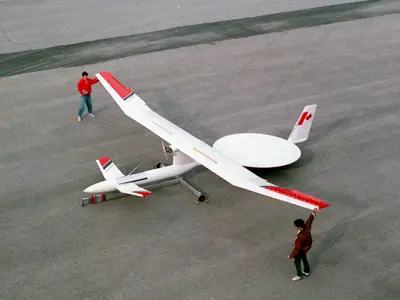
The first experiment for long distance wireless power transmission was carried out by the Communications Research Centre in Canada during the year 1980. They designed an unmanned plane by the name Stationary High Altitude Relay Platform (SHARP). This plane could not only fly from one point to another, but could also fly in circles at a height if 21 kilometres away from the ground with a radius of 1 kilometre. It was also designed to fly without rest or battery backup for months.
Stationary High Altitude Relay Platform (SHARP)
The main idea behind the SHARP technology is a large ground-based microwave transmitter. The plane will fly only in the range of the transmitter. The signal from the transmitter will be received by a disc-shaped rectifying antenna called the rectenna, which is placed behind the wings of the plane. This signal will then be converted into DC current. The antenna is usually of the dipole type, that is, it has positive as well as negative poles. When the signal hits the antenna, they will be transferred to a series of diodes. These diodes behave like switches and allow the electrons to flow in unidirection. These electrons are then passed onto the rectenna’s circuitry. The electrons are then shifted to the other parts of the plane.
In many ways, you could attribute the current rush of toys accessories powered by our smartphones to the Parrot AR Drone. The ability to fly a really cool looking quad-copter through the office with your smartphone was enough to excite any geek, and Parrot made that happen. The eventual growth to include both iOS and Android software to control the drone meant a massive market of people to enjoy the device. Now, as other smartphone-controlled gadgetry, like Sphero, is hitting the market, Parrot felt the need to refresh the AR Drone and give it some new bragging rights with the Drone 2.0.
New and Improved Hardware
The original AR Drone is still incredibly fun to operate, but the first thing anyone does with one is crash it into something. Unfortunately, for some, that’s the last time your AR Drone 1.0 is intact. Parrot redesigned the hulls for the Drone 2.0 to handle much more stress. When using it indoors, the foam composite hull that goes around the blades has been improved, without being any heavier. In the demonstration, the AR Drone 2.0 rammed the wall of the convention center as fast as it could go, and bounced off without a scratch.
When you take the Drone 2.0 outside, you remove that outer hull and let the new aerodynamically engineered EPP hull protect the quad-copter without risking it being blown away. EPP is a damage resistant plastic commonly used in car bumpers. The Parrot guys weren’t quite as willing to crash the AR Drone 2.0 with the foam core off of it, since your blades are exposed in that configuration.
The camera on the AR Drone 2.0 took a big boost as well, offering a 720p view of the world from your controller. The camera records at 30 fps, and allows you to upload the videos to YouTube as soon as you are finished recording them. Since your only rage limitation is how far your point to point WiFi connection with the Drone 2.0, the end result is a high definition aerial view that you have complete control over.
All New Software
The App Store and the Android Market are now serving up the AR FreeFlight 2.0 app to complement the new hardware from Parrot. This update includes a significant UI update and several new features to play with. With FreeFlight you can control the drone and record your flights or take pictures as you fly around, but you can also take the flight data and share it with other AR Drone users. Altitude, duration, location, and speed information are all recorded and easily shared through the app. To compliment this ability, the AR Drone Academy function lets you see how-to videos and location data for the best flight zones in your area.
Firmware updates for the AR Drone 2.0 are also handled through the app. When an update is available for your drone, the icon will light up, and you can install the update with a tap. The update is sent over the WiFi connection with the Drone, so everything can be done quickly and efficiently.
As more developers take advantage of the open development platform for the AR Drone, the AR Games section of the app will fill with more augmented reality, tag, and other inventive ways to play with the Drone.
When you fly the AR Drone, you can do it by looking at the drone and piloting with the FreeFlight controller, or you can use Absolute Flight, and use just your smartphone or tablet. The app will show you from the camera how the world looks from the drone’s perspective, but there are a few more things going on here. Absolute Control uses a 3D magnetometer to keep itself oriented. Using your controller as the orientation point, you no longer need to worry about how level the Drone is. However, if you’re an experienced Drone pilot, you can make the Drone 2.0 do aerial somersaults and exert much more control over how this version performs.
Final Thoughts
All across the board, the Parrot AR Drone 2.0 feels like a solid upgrade. It is much easier to fly, built better, and the 720p camera does a great job of catching cool aerial shots. With all of those upgrades, the AR Drone 2.0 is still $300. While it may be the most expensive accessory you buy for your phone, it is by far the most entertaining.
When you're in front of your PC, waiting for something to transfer to removable media, that's when seconds feel like minutes, and minutes feel like hours. And data storage scenarios such as that one is where the new SuperSpeed USB 3.0's greatest impact will be felt first. As of CES, 17 SuperSpeed USB 3.0-certified products were introduced, including host controllers, adapter cards, motherboards, and hard drives (but no other consumer electronics devices). Still more uncertified USB 3.0 products are on the way, and they can't get here fast enough.
The USB connector has been one of the greatest success stories in the history of computing, with more than 2 billion USB-connected devices sold to date. But in an age of terabyte hard drives, the once-cool throughput of 480 megabits per second that a USB 2.0 device can realistically provide just doesn't cut it any longer.
USB 3.0 (aka "SuperSpeed USB") promises to increase performance by a factor of 10, pushing the theoretical maximum throughput of the connector all the way up to 4.8 gigabits per second, or processing roughly the equivalent of an entire CD-R disc every second. USB 3.0 devices will use a slightly different connector, but USB 3.0 ports are expected to be backward-compatible with current USB plugs, and vice versa. USB 3.0 should also greatly enhance the power efficiency of USB devices, while increasing the juice (nearly one full amp, up from 0.1 amps) available to them. That means faster charging times for your iPod--and probably even more bizarre USB-connected gear like the toy rocket launchers and beverage coolers that have been festooning people's desks.
The USB 3.0 spec is nearly finished, with consumer gear now predicted to come in 2010. Meanwhile, a host of competing high-speed plugs--DisplayPort, eSATA, and HDMI--will soon become commonplace on PCs, driven largely by the onset of high-def video. Even FireWire is looking at an imminent upgrade of up to 3.2 gbps performance. The port proliferation may make for a baffling landscape on the back of a new PC, but you will at least have plenty of high-performance options for hooking up peripherals.
The latest version of Microsoft Surface table can be ordered now. The Samsung device developed in collaboration with Microsoft offers a 40-inch large touch screen that can recognize objects.
In the first quarter of this year, Microsoft had presented to the next generation of the successful Surface table at CES. Now this can be pre-ordered in 23 countries, where delivery will take place from early 2012. The Samsung SUR40 is equipped with a 40 inch large touch screen that has a resolution of 1,920 x 1,080 px.
Since the device can simultaneously detect up to 50 touches, can thus operate more than one person simultaneously therewith. The interactive table can also recognize objects and embed them right into the action, as demonstrated in the following video:
Samsung and Microsoft had made available the first Microsoft Surface 2.0 multi-touch table, the Samsung SUR40. The Samsung SUR40 is now available for pre-order in 23 countries like: United States, Canada, parts of Asia and Europe, ahead of its launch in January 2012. The Samsung SUR40 is designed and intended for business, but Microsoft has noted that the tables can be taken on board one at a time, at a price of about $7,600 each.
The Samsung SUR40 sports Microsoft’s Surface technology and works as an intelligent table with a 40-inch 1080p multi-touch surface that distinguishes fingers, blobs and a host of objects. The Samsung SUR40 can be used to enlighten and amuse patrons.
The Samsung SUR40 is fully-embedded PC with a high definition 40-inch wide touchscreen display, a powerful 2.9GHz AMD Athlon II X2 Dual-Core processor, an AMD Radeon HD 6750M Series graphics card for best video experience, a 4GB of RAM, a 320GB of hard disk drive and an embedded version of Windows 7 Professional 64-bit Operating System with a Surface 2.0 SDK.
Google TV is a software platform aiming to bring together traditional TV and video content from the web. The internet is quickly becoming a major channel of multimedia content delivery however a large portion of content is still TV exclusive. The best of both worlds can be accessed with the help of GoogleTV. Google has created a video which gives a good quick introduction to its new TV platform
The platform is not invasive to your current TV setup. It creates a completely new experience while preserving compatibility. A number of big name companies are planning to ship TVs with built in Google TV in the future. However, if you have current cable or satellite subscriptions that you are happy with, the search giant's platform can be experienced by setting up a Google TV powered box on top of your current hardware. At the moment a launch date is expected to be on September 29th, which will mark a release of Logitech Revue box. The expected price for this Google TV companion box unit is $299.
The platform works by combining channels from your existing cable ⁄ satellite providers with the valuable content on the web — including Hulu, Fox Networks, CBS, Youtube, etc.
Though many details are still unknown, Google TV hardware is controlled with a QWERTY keyboard enabled remote control.
Once you launch the system, you will be greeted by Google TV's primary interface — a search box. Type in what you want to watch and the system will find it on air among the available channels and also among the large database of web content.
Clicking through TV channels available via cable ⁄ satellite subscriptions is also possible just like before. The internet will be accessible the usual way we know on the PC. Google TV comes equipped with a flash-enabled browser which can be used to freely browse the internet. Whether you want to look up information about the current show on air or watch the latest YouTube videos, you can do so easy and in a slick manner with the video playing on screen.In addition, Google TV is compatible with DVR box units
Naturally, Google TV has many powerful tricks up its sleeve. All the features will be made public and assessed once the product hits final release. For now, it is known that Google TV will be compatible with android devices, though the level of integration is unknown at the moment — the possibilities are astounding. Then comes a browser with complete Flash support. Bringing the variety of Flash video content from the popular TV networks on the network would be another invaluable feature. The most ambitious feature is real time translation of shows in foreign language to subtitles. Once again, this is a jaw dropping possibility that needs to be tested out in real world in order to evaluate how good it does its job. The Android App store is planned to support Google TV devices as well. Obviously, only a limited number of apps will be compatible, but the developers will be encouraged to optimize for the platform.
For Google it's obviously a possibility to enter a new market — a market of TV, which according to them has a worldwide audience of 4 billion people daily. The prospects of a massive advertisement audience could lure Google into a great deal of dedication to the project.
Hear this: The latest Google TV, referred to as Google TV 2.0 throughout the rest of this review, is a star performer. It runs like a champ and it’s clear that Google engineers paid close attention to criticism of version 1.0. Most of the functions and design elements previously missing are elegantly included. However, most of the downfalls of the older version had nothing to do with user interface. Content is king and Google TV sill doesn’t wear the crown.
Even with the recent 3.1 update, . Google TV is still missing many key features to disrupt the television industry. It’s going to take more innovation, content deals, and devices to get the ball rolling.
There are a lot of unknowns about Google TV that complicate these tests. Mobile Android is pretty lacking in video codec support, for example. That's forgivable on a smartphone, but a dealbreaker on a media center. If I can't stream my torrented TV episodes because Google TV doesn't support Xvid MKV, it's worthless to me. I wasn't able to get much of a look at Hulu or Netflix through Google TV--what's it like to browse through those sites? (And it sounds very likely that Hulu won't be available on the service after all, unless some deal is struck before launch.) Is it like Roku or Boxee, where you're limited to the movies that are already in your Instant Watch queue? Can you browse new releases, instead of having to search for them?




.png)


